Function Blocks
Function blocks are the core building blocks of object-oriented programming in IEC 61131-3. They behave in a similar way to classes in other modern object-oriented programming languages like C# and Python. You can use function blocks to encapsulate both data (variables) and behavior (methods), making them perfect for creating clean and scalable logic.
Purpose
Function blocks can be used to model components commonly used in industrial automation such as: - Motors - Valves - Temperature Controllers - Communication Modules
Function blocks allow you to reuse your code in scenarios where you have multiple instances of the same object.
Each instance of a function block maintains its own internal state.
Key Features/ Settings
- Access specifier
- Extends
- Implements
- Final
- Abstract
- Methods
- Properties
How to
Adding a new function block
To add a function block to your project:
--> Right click Application (device tree)
--> Add Object
--> POU...
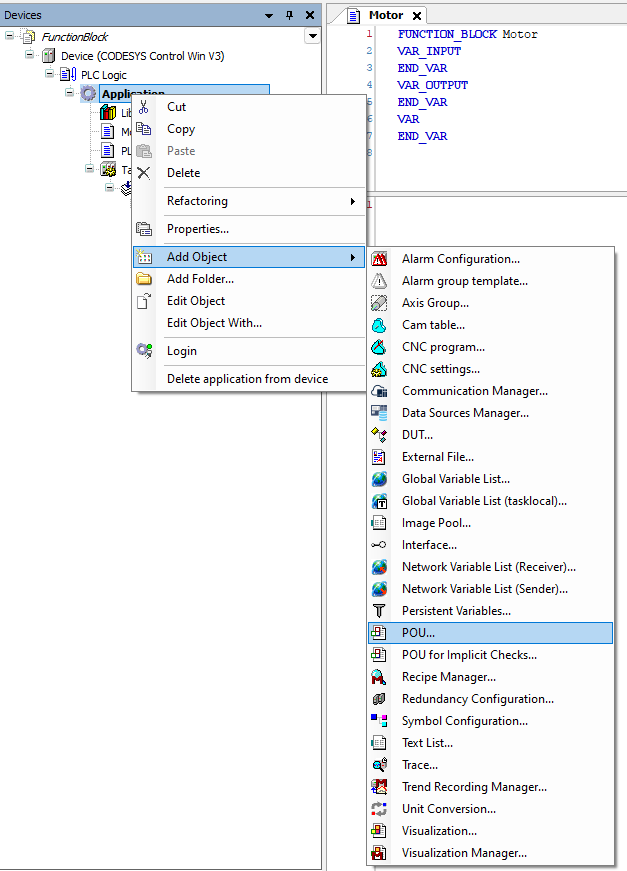
Configuring a function block
You will see the POU selection and configuration window appear (Add POU).
Firstly, select the Funtion block radio button.
You are presented with a few different options most of which we will cover in future examples but you should notice that only the function block type gives you access to these additional features:
Extends - This allows to you specify a parent function block (see inheritance example)
Implements - This allows you to specify an interface to be implemented by this function block (see interface example)
Final - Prevents the function block from being extended or sub-classed (see inheritance example)
Abstract - Prevents the function block from being instantiated directly (see inheritance example)
The access specifier dictates how visible your function block will be to the rest of your project. For now, just set this to PUBLIC.
INTERNAL can be useful for library development and restriciting which function blocks are exposed to the rest of the project.
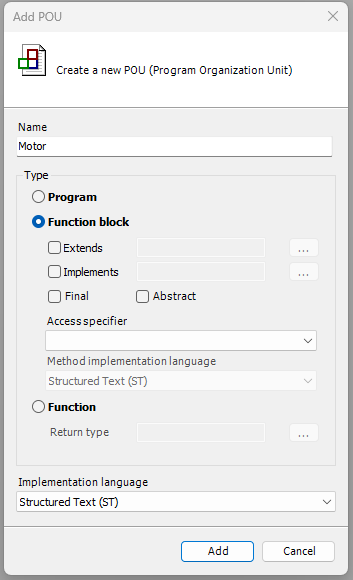
You can choose to implement your function block using
Example
Clone and check out the project in the examples folder!