Command Pattern
The Command Pattern is a behavioral design pattern that turns requests or actions into standalone objects—commands—that can be queued, logged, or executed later. It’s especially useful in automation when you want to decouple how an action is triggered from how it’s performed.
Here is a simple use-case:
Imagine an operator needs to schedule a series of maintenance actions via the HMI to be executed the next time the machine reaches a safe state (e.g. during a lunch break).
The operator can queue any combination of actions in any order they choose, for example: • 𝗖𝗹𝗲𝗮𝗻 • 𝗣𝘂𝗿𝗴𝗲 • 𝗜𝗻𝘀𝗽𝗲𝗰𝘁
This is where the 𝗖𝗼𝗺𝗺𝗮𝗻𝗱 𝗣𝗮𝘁𝘁𝗲𝗿𝗻 works well. Instead of hardcoding the sequence or relying on tightly-coupled logic, we can:
-
Define an ICommand interface
-
Build a queue to manage command objects
-
Implement specific command function blocks or classes to encapsulate each action
✅ This makes it easy to 𝗾𝘂𝗲𝘂𝗲, 𝗿𝗲𝗼𝗿𝗱𝗲𝗿, 𝗮𝗻𝗱 𝗲𝘅𝗲𝗰𝘂𝘁𝗲 commands at the right time. ✅ Logic becomes 𝗺𝗼𝗱𝘂𝗹𝗮𝗿 𝗮𝗻𝗱 𝗿𝗲𝘂𝘀𝗮𝗯𝗹𝗲, not tangled inside giant conditionals or state machines (although, I do like a state machine...). ✅ Testing and scaling is easier allowing you to simulate, validate, and add new commands independently.
How-To
1. Add an Interface
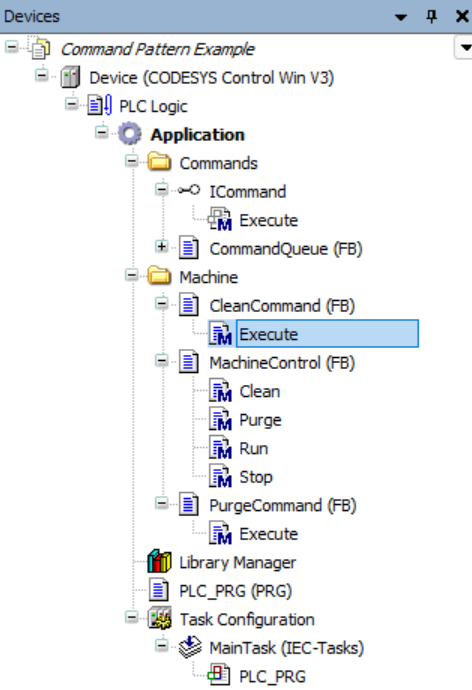
First we need to create an interface for our command objects. You can refer back to the Interfaces example if needed. Our interface needs to define an Execute() method as a minimum. We will call the interface ICommand.
2. Create Command Function Blocks
Next we need a function blocks that encapsulate the different commands that need to be queued. You can refer back to the Function Blocks example if needed. All of our Command Function Blocks must implement the ICommand interface and accept a reference to whichever FB we need to act on.

3. Create a Queue
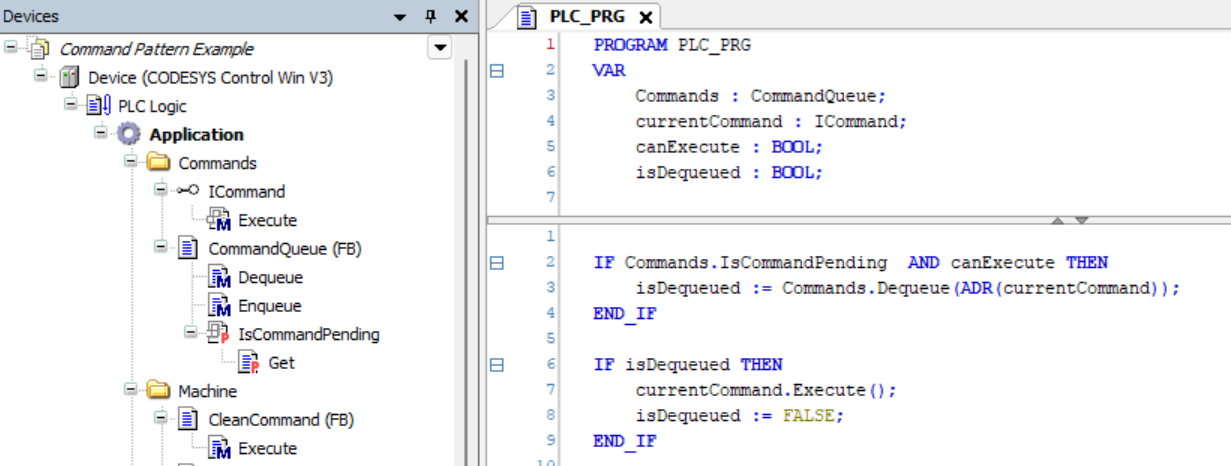
Finally, we need a queue that accepts any objects implementing the ICommand interface. By using a common interface we are able to queue different command objects together.
Example
Clone and check out the project in examples folder!