Methods
Methods are reusable, encapsulated pieces of logic that belong to a Function Block or Class. They're like functions, but scoped to a specific object instance - letting you operate on that FB’s internal state.
This is a big step toward writing modular, readable, and maintainable code.
Purpose
Methods are useful for:
-
Hiding internal logic that doesn't need to be exposed outside the Function Block
-
Reusing logic to avoid unnecessary repetition
-
Breaking code into smaller, more readable pieces
-
Making it easier to test individual parts of your program in isolation
How-To
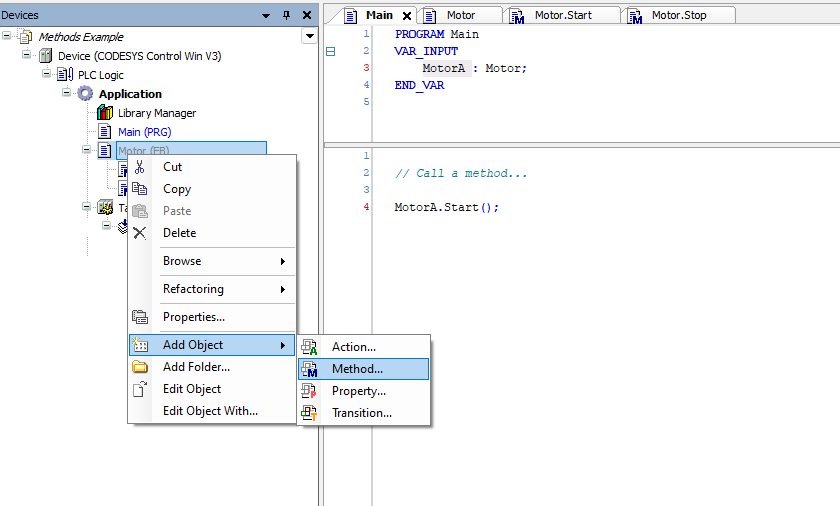
Adding a method to a function block
To add a method to your function block:
--> Right click the function block
--> Select Add Object
--> Choose POU...
Configuring a method
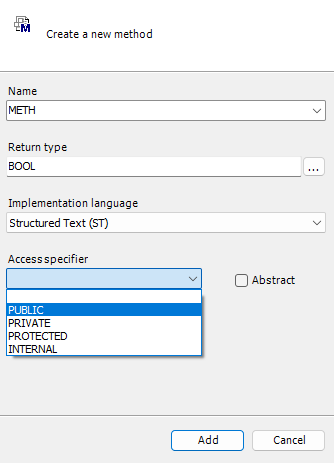
You’ll see the Add Method dialog.
Firstly, give your method a clear and meaningful name (or not, your choice...)
You then have the option to select a return type. If you only want your method to perform an action and not return a value then you can simply leave this blank.
However, if you do want to return something once your method has finished running then speicfy it here.
Just like with Function Blocks, you can assign an access specifier to control how the method is exposed:
Public - Makes the Function Block, method, or property accessible from anywhere in the application.
Private - Restricts access to within the same Function Block or class — not visible to external code.
Protected - Accessible only from within the Function Block and its derived types.
Internal - Accessible only within the same library or application scope, but not visible outside it.
Access specifiers give us control over how the method can be viewed and interacted with from outside the function block.
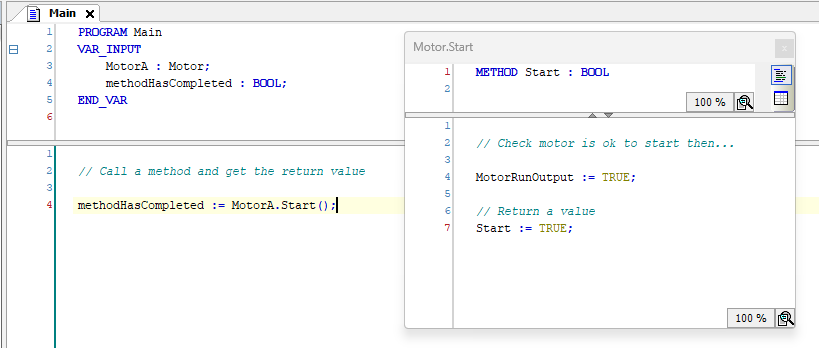
Here’s a screenshot from the example project showing a method being called from another POU. You can see how the return value (a BOOL in this case) is captured after the method completes.
Example
Clone and check out the project in the examples folder!